SAP Solution Manager 2026:
Overview, Future & Alternatives

For many organizations, SAP Solution Manager (SolMan) remains the primary solution for the administration of their SAP enterprise applications. Among other things, it supports change request management, IT service management, monitoring, test management, and solution documentation. Since mainstream maintenance for SAP Solution Manager 7.2 will end in late 2027, companies should assess today which SolMan functions they still need.

SAP will end maintenance and further development for Solution Manager in 2027.

What is SAP Solution Manager (SolMan)?

SAP Solution Manager, also known as SAP SolMan or just SolMan, is an intelligent platform for Application Lifecycle Management (ALM). ALM in turn comprises tools and processes that are necessary to manage the entire lifecycle of software: from the initial idea through development and operation to decommissioning.

In practice, SolMan is particularly relevant in established on-premise SAP environments. There, it often serves as a central platform for technical monitoring, change management, documentation, and operational stability.

Basically, SolMan is a collection of tools and services that help manage and monitor SAP environments. Solution Manager is already integrated as a toolset in all SAP systems and can generally be used by license customers at no additional cost.

SAP Solution Manager

Solution Manager is the central platform for optimizing and automating business processes that supports companies in their digital transformation. As a central tool, SolMan provides transparency in complex system environments and enables secure SAP system administration. As a reliable “single source of truth”, SAP Solution Manager makes a significant contribution to reducing costs and increasing efficiency by centralizing the applications of an SAP environment and thus minimizing administrative effort.

SAP SolMan offers the following advantages:

  • Deep system integration: SolMan is closely integrated with existing on-premises SAP systems - ideal for companies with a historically grown SAP landscape.
  • Extensive monitoring functions: Powerful system monitoring and root cause analysis for local systems - particularly relevant for sensitive or critical infrastructures.
  • Strong tool support: Including established tools such as ChaRM, Test Suite, IT Service Management - can be fully integrated into existing processes.
  • Proven & refined: Decades of development and use – especially proven in complex SAP environments.
  • Stable operation in familiar infrastructure: No dependency on the cloud infrastructure.
  • Central platform for ALM: Manage all relevant SAP systems and processes in one place - ideal for standardized application lifecycle management.
  • Free for SAP licensees: SolMan is available at no additional cost.
  • Supports ITIL processes: Integrates central ITIL areas such as incident, problem and change management for professional IT service management.

What is SAP Solution Manager 7.2?

SAP Solution Manager 7.2 is the current major release of SAP Solution Manager. Among other things, it introduced revised solution documentation, improved user interfaces, tighter integration with test management, and features for operations, monitoring, and change management. At the same time, SolMan 7.2 is the last strategically significant version: SAP will not be releasing a new successor version of the classic Solution Manager.

Version 7.2 provides functions to extend and improve system landscape management, such as the following:

  • A new as well as intuitive user interface that supports web-based interfaces and management dashboards. It enables platform-independent operation of Solution Manager with role-based access to functional areas.
  • A revision of the solution documentation that fully integrates the system to SAP test management.
  • In the IT Service Management (ITSM) section, there is a completely updated interface.
  • The Maintenance Optimizer (MOPZ) was also completely revised in the process of the changeover and replaced by its successor, Maintenance Planner, in order to optimize change management.
  • SolMan 7.2 ensures increased productivity through the availability of IT tools and resources.
  • The latest version of SolMan supports the use of the SAP HANA database and can be used under SAP S/4HANA via SAP Cloud Platform: The integration of cloud-based and classic on-premise solutions thus enables the seamless management of hybrid software environments.

What is SAP Solution Manager used for?

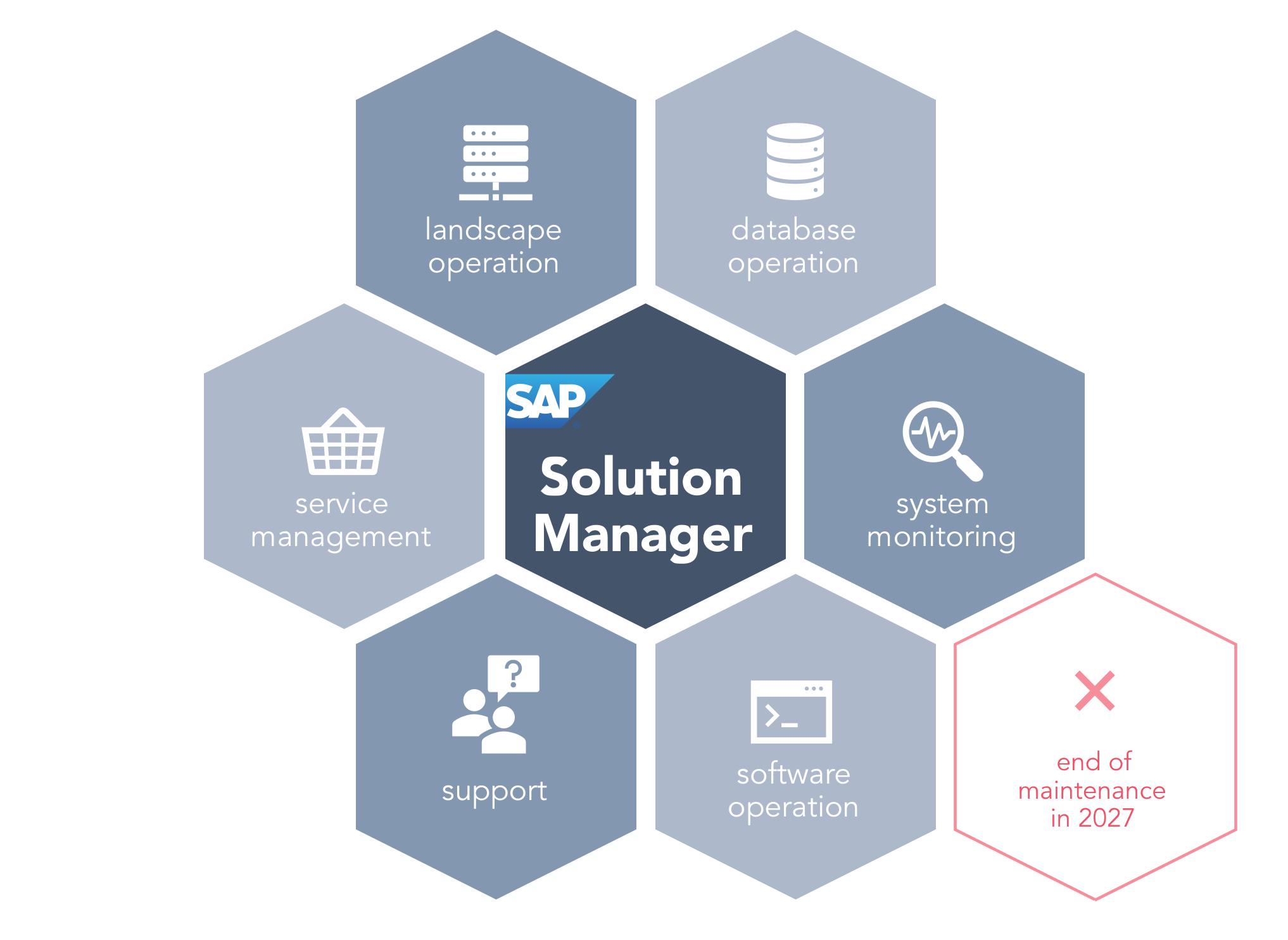
Solution Manager is modular, so you can flexibly adapt it to the individual needs of your company. Thanks to its deep integration, Solution Manager has access to all technical information within the SAP system landscape. In this way, it not only supports stable system operation, but also enables agile, future-proof application lifecycle management. Below we list the most important modules and their functions:

Application Operations

Provides central functions for system monitoring, integration monitoring and user experience monitoring. Administrators can keep an eye on the status of all systems and react proactively to problems.

Business Process Operations

With the help of the Business Process Operations module, companies can always keep track of all aspects of the core business process, such as costs In addition, this allows you to ensure that all processes are in line with internal priorities.

Data Volume Management (DVM)

Data Volume Management checks and controls the data volume of the entire SAP system landscape.

Custom Code Management

Custom Code Management provides a central component for all functions to monitor and manage the entire development cycle of code generation.

Change and Request Management

SAP Solution Manager enables companies to customize changes in their SAP landscape using “Change and Request Management” (ChaRM). Alternatively, changes in the SAP landscape can easily be made with REALTECH SmartChange. SmartChange is a flexible tool that can be operated without much effort, is cost-effective and can be integrated into various systems.

IT Service Management (ITSM)

IT Service Management (ITSM for short) is the provision of IT as a service – for employees and customers. This includes all processes and activities related to the planning, compilation, delivery and support of IT services.

An excellent alternative is SmartITSM, which covers all functions from ticketing and IT operations to CMDB. SmartChange also offers the option of integrating SAP transports directly into your ITSM tool. This enables transparent end-to-end processes and saves you the detour via Solution Manager.

Landscape Management

Landscape Management describes processes in the IT landscape that run across multiple tools and enables efficient planning of all changes within an SAP system landscape that are necessary for smooth operations.

Optimize your landscape management with a CMDB. The CMDB collects scattered data in a central location, including data that is not usually stored in SAP. Information about the entire infrastructure (SAP and non-SAP) is made easily accessible.

Project Management

Solution Manager is integrated with the project management functions of SAP Portfolio and Project Management (SAP PPM). This allows you, for example, to easily manage project times, resources and the status of processes and developments .

Test Management

The “Test Management” module supports you in performing tests of new developments and checks their environments and conditions. The function covers all test phases, from planning and execution to the creation of test reports.

Cross Topics

Here you will find information on overarching topics in Solution Manager such as Content Activation, SAP Solution Manager Setup, SAP Engagement and Service Delivery, Analytics and more.

Diagnostics & Monitoring

SAP Solution Manager Diagnostics is part of SAP’s own “Standards for Solution Operations” and is the central analysis and monitoring tool for identifying problems and performing cross-system analyses in the SAP landscape.

SAP Solution Manager: Challenges

Despite its wide range of features, SAP Solution Manager is costly to operate for many companies. These costs relate to technical aspects as well as organizational, expertise, and strategic considerations.

Due to its wide range of features, SolMan is very complex and not easy to administer. Operating it requires significant staff resources and specialized expertise, which are difficult to come by these days. Due to the proprietary architecture and the lack of standardized interfaces, complete integration is difficult and involves additional effort.

The most common pain points are:

  • High operating costs: Solution Manager is complex and requires time, internal resources and in-depth SAP expertise. Without experienced personnel, operations can quickly come to a standstill.
  • Maintenance intensity: Unlike modern cloud solutions, SolMan requires regular manual maintenance: system updates, security patches, technical upgrades. This ties up valuable resources and causes long-term costs, especially when IT capacities are limited.
  • Steep learning curve: Many of the tools included (e.g. change request management or solution documentation) have their own logic, functions and best practices. This often leads to teams being overwhelmed if they lack training or experience.
  • Slow innovation: While cloud-based tools such as SAP Cloud ALM are constantly receiving new functions, the further development of Solution Manager is increasingly stagnating - especially with a view to the end of maintenance in 2027. This means that new requirements can only be implemented to a limited extent in some cases.
  • Limited cloud capability: Solution Manager is primarily designed for on-premises scenarios. In hybrid or cloud-first architectures, it reaches its functional limits, for example when integrating cloud-native SAP applications or using automated updates.

SmartChange: The Simple ChaRM Alternative

SmartChange offers a simple, efficient and cost-effective solution for change management – faster, more secure and more user-friendly than SolMan ChaRM.

What does the end of support for SAP Solution Manager in 2027 mean?

SAP Solution Manager 7.2 will remain under mainstream maintenance only until the end of 2027. For certain customers, extended maintenance is available until the end of 2030 if they use the optional extended maintenance for SAP Business Suite 7. Companies should therefore assess early on which SolMan functions are business-critical and which successor solutions are viable options.

For many SAP customers, this is a strategic turning point: SAP is clearly shifting its focus to the cloud, or more precisely to SAP Cloud ALM as the successor solution. While SolMan focused on individual adaptability, Cloud ALM pursues a standardized cloud approach. Whether this change makes sense for your company depends heavily on your system landscape.

Understand the End of Support

Find out what the end of support for SAP Solution Manager means for your existing processes and how you can prepare.

Replace ChaRM after 2027

If you currently use ChaRM for SAP changes and transports, you will need a viable alternative for your processes after 2027.

Migrate Change Documents

Back up your existing ChaRM Change Documents and ensure that your history remains traceable and auditable even after SolMan is discontinued.

Delve into the latest expert interview to find out how companies are mastering the transition from SAP Solution Manager. Torsten Thal explains how SmartChange and ITSM integration work together in practice. Using specific practical examples, he shows what is important during implementation and what experiences other companies have had.

How does SAP Solution Manager fit into your SAP strategy?

The proven methods and tools based on SolMan must now be reevaluated in the context of an evolving SAP landscape. Review your SolMan strategy at the latest when any of the following apply:

  • You use ChaRM for change and transport processes.
  • You must store change documents in a manner that ensures compliance with audit trails.
  • You operate hybrid SAP environments.
  • You are planning S/4HANA, BTP, or cloud projects.
  • You want to integrate Jira, ServiceNow, or other ITSM tools more closely.
  • You have limited SAP Basis resources.
  • They want to avoid having to migrate under time pressure just before 2027.

The end of SAP Solution Manager maintenance is therefore a wake-up call that requires an urgent review and adjustment of your SAP strategy.

Change Management beyond ChaRM

The end of Solution Manager is coming: What’s next for your SAP Change Management?

What alternatives are there to SAP Solution Manager?

There is no one-size-fits-all replacement for all SolMan functions. The best alternative depends on which modules a company uses: Monitoring, ITSM, Test Management, ChaRM, Documentation, or Change and Transport Management.

Requirement Possible alternative
Cloud ALM for Implementation and Operations SAP Cloud ALM
High-volume technical monitoring SAP Focused Run
Change and Transport Management / ChaRM Replacement SmartChange or other specialized third-party providers
IT Service Management ITSM tools such as ServiceNow, Jira, and SmartITSM
Test Management SAP Cloud ALM, specialized test management tools
Documentation / Historical Data Review Migration/Archiving Strategy

What third-party alternatives are possible?

Not every company needs the full scope of SAP Solution Manager. Many deliberately rely on specialized third-party tools that map individual ALM disciplines better, faster and more user-friendly.

REALTECH also offers solutions that replace individual Solution Manager features. Our product portfolio includes lean and easy-to-administer software for change management (SmartChange), as well as the ITSM solution SmartITSM, which serves all your IT service management needs, including SAP-Integration.

REALTECH SmartChange

SAP change management made easy with SmartChange: Automated deployments, integrated quality assurance and simple system retrofits for effortless SAP transport management.

Will Cloud ALM replace Solution Manager?

The answer is yes and no. SAP Cloud ALM is not designed as a 1:1 replacement for SAP Solution Manager, but is aimed at other target groups with a cloud-centric approach. While SolMan primarily supported on-premise systems in complex SAP landscapes, SAP Cloud ALM focuses on standardization, cloud integration and modern usability.

Conclusion: Is SAP Solution Manager still state of the art?

For many companies, SAP Solution Manager remains an important platform for traditional SAP ALM processes. Especially in established on-premise environments, SolMan continues to cover key tasks such as monitoring, ChaRM, ITSM, test management, and documentation. At the same time, it is clear that with the end of maintenance in 2027, the traditional Solution Manager will lose its strategic future. Companies should therefore not migrate across the board, but first assess which SolMan functions they actually use and which successor solution makes sense for each area.

Third-party solutions also offer practical alternatives, especially for companies that are not aiming for a complete cloud migration. One thing is clear: acting early ensures technological stability and long-term planning security.

Next step: Find out what the end of support means specifically for your SolMan and ChaRM processes.

Understanding the essentials

  • Definition: SAP Solution Manager is the central tool for application lifecycle management (ALM) in classic SAP system landscapes. It integrates functions such as change management (ChaRM), ITSM, system monitoring, test management and much more.
  • End of maintenance: SAP has set the end of maintenance for SolMan at 2027 (optionally until 2030). At the same time, the focus is shifting towards SAP Cloud ALM, a new, cloud-based platform with a standardized range of functions.
  • For companies, this means:
    • Strong pressure for action: The time remaining until the end of maintenance requires strategic decisions.
    • Cloud is not suitable for everyone: SAP Cloud ALM does not replace SolMan 1:1 and functions such as ChaRM are missing.
    • Complex migration: Historical data and processes need to be rethought or migrated.
  • What are the options?
    • SAP Cloud ALM: Cloud solution with a focus on standardized scenarios.
    • Third-party tools such as SmartChange: solutions that replace individual modules such as Change Management or ITSM. SmartChange also supports you with the migration of historical SolMan data.

Helpful advice: Evaluate your current use of Solution Manager and define your requirements. Not every company needs all SolMan functions. Many deliberately opt for third-party tools that support individual ALM disciplines more efficiently.

FAQs: SAP Solution Manager

Solution Manager is a central software for the administration of SAP enterprise applications. As an application management solution, SolMan provides functional support to the IT infrastructure and helps optimize the effective management of the software environment throughout the application lifecycle.

SAP Solution Manager is primarily used as part of Application Lifecycle Management (ALM). It helps to monitor, control and optimize SAP systems throughout their entire lifecycle by providing functions for administration, troubleshooting and test management. This ensures the efficient use and long-term stability of SAP applications.

SAP Solution Manager ensures that the system landscape is continuously monitored and its smooth functioning is guaranteed. It provides all the necessary content, tools and services that are used within the framework of Application Lifecycle Management (ALM) to maintain system functionalities and the optimal use of applications.

The regular maintenance period for SAP Solution Manager ends in 2027, after which there will be no more regular updates or technical support. SAP does offer optional extended maintenance until the end of 2030. For many companies, it therefore makes strategic sense to replace Solution Manager in good time.

SmartChange is an alternative to ChaRM. The solution covers all relevant requirements in SAP change management and offers a significantly higher degree of automation. For companies currently using ChaRM, SmartChange offers a seamless changeover thanks to an automated migration solution.

No, a change is not mandatory. Many companies rely on third-party tools such as SmartChange instead. SmartChange offers a modern, lean and easy-to-administer solution for SAP change management.

In this article: