SAP-ITSM Integration

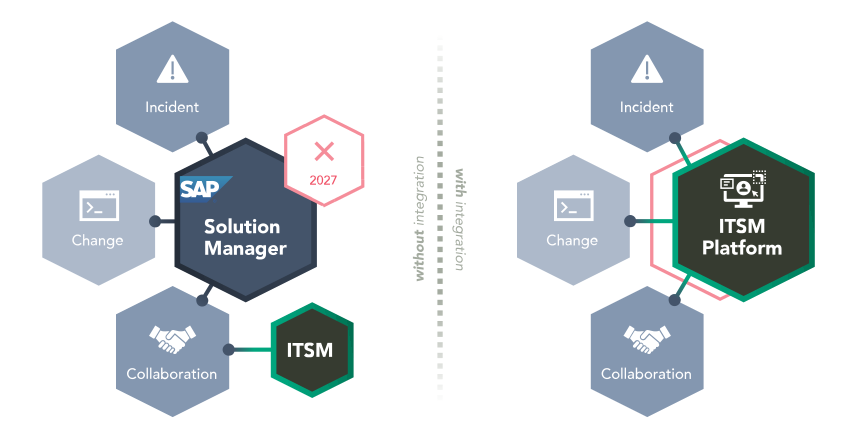
SAP processes such as Change, Transport and Incident Management are often deeply rooted in the organization, but are not always integrated into existing ITSM structures. This results in media disruptions, manual coordination and a lack of transparency. Find out how you can successfully replace SAP Solution Manager with SAP-ITSM integration from REALTECH and which solution suits your system landscape.

TL;DR – Key facts in brief

  • Definition: SAP ITSM integration connects SAP change, transport, and incident processes with ITSM platforms such as ServiceNow, Jira, or SmartITSM.
  • Benefits: Tickets, changes, approvals, and transportation are handled end-to-end – without duplicate data entry, email coordination, or manual status updates.
  • Replacing SolMan: With the end of SAP Solution Manager, integration into existing ITSM processes is becoming a key alternative for SAP teams.
  • SmartChange: REALTECH connects SAP transports with ServiceNow, Jira, or SmartITSM – preconfigured, audit-ready, and without the need for a major integration project.

What does SAP-ITSM Integration mean?

SAP-ITSM integration describes the automated connection of SAP systems with IT Service Management (ITSM) platforms such as ServiceNow, Jira or SmartITSM. The aim is a consistent, cross-system process for incidents, changes and service requests – without manual handovers, duplicate data maintenance or communication gaps. In concrete terms, this means:

  • an incident in the ITSM tool automatically generates a message in the SAP system.
  • an approved change directly triggers a transport request in SAP.
  • an SAP system reports a technical error that is directly visible in ITSM and can be processed there.

More relevant than ever: The end of SAP Solution Manager

Many companies have organized their SAP change and incident processes in SAP Solution Manager or ChaRM for years. At the same time, ServiceNow, Jira, and other ITSM platforms have long been the leading systems for IT service processes. This creates a disconnect: SAP operates within its own structures, while ITSM teams use other tools to manage, prioritize, and document processes.

With the end of support for SAP Solution Manager, this separation becomes a risk. Companies must decide how they will organize SAP changes, transports, and incidents going forward: in SAP Cloud ALM, in existing ITSM platforms, or using a specialized solution such as SmartChange.

Integrate SAP and ITSM with SmartChange

Best Practice Guide: How to save 4 weeks of project time

Scenarios & Benefits of SAP-ITSM Integration

SAP processes such as Incident, Change or Transport Management often affect several teams and are highly regulated at the same time. If they are not properly integrated into the central ITSM, friction losses, duplication of work and, in an emergency, even audit risks arise. Here are three typical scenarios in which SAP-ITSM integration pays off in particular:

1. SAP Incident Management

A business unit reports an SAP issue in the ITSM system. Without integration, the SAP team must manually transfer the information, resolve any questions, and update the status separately.

Through integration, incidents are transferred to SAP in a structured manner, feedback is automatically synchronized, and all parties involved remain informed within their respective systems.

Result: faster processing, fewer queries, complete process documentation

2. Automated Change Process between ITSM and SAP

A change request is submitted and approved in the ITSM tool. Without an SAP integration, the handoff often takes place via email, chat, or phone – including manual transport setup and separate documentation.

Through integration, change requests, approvals, SAP transports, and status messages are linked together.

Result: time savings, audit readiness, consistent change history

3. Better Collaboration between SAP Basis and IT Service Teams

SAP Basis, development, business units, and ITSM teams often work in different systems. As a result, information gets lost or responsibilities remain unclear.

Integration creates a shared process backbone with clearly defined roles, statuses, and handoffs.

Result: less coordination effort, more transparency, more efficient collaboration

What happens if SAP and ITSM stay unlinked?

SAP is the backbone of many business processes, but in Change and Support Management it often remains a black box. While central ITSM platforms have long been established, SAP-relevant processes still run in separate tools, workarounds or shadow processes in many places.

  • Dual management of tickets, transports, and status information
  • Unclear responsibilities between SAP Basis, Development, and the ITSM team
  • Manual handovers via email, chat, or Excel
  • Lack of transparency on change and transport status
  • Incomplete documentation for audits and internal controls

At the latest, when IT processes scale or are subject to regulatory scrutiny, it becomes clear that without integration, there is no basis for reliable control.

Particularly critical: regulatory Changes

In industries with mandatory audits (e.g. pharmaceuticals, finance, energy or critical infrastructure), technical implementation is not enough. The change must be formally correct, traceable and centrally documented.

Without SAP-ITSM integration, central weaknesses arise here:

  • permits and risk assessments only fragmentarily documented,
  • SAP protocols and ITSM tickets run independently of each other,
  • no consistent audit trail across system boundaries.

Companies with requirements in accordance with SOX, ISO 27001, GxP or internal IT governance standards risk audit deviations, additional work or even certification problems.

How can SAP be integrated with ITSM Tools?

SAP can be integrated with ITSM tools such as ServiceNow, Jira, or SmartITSM via APIs, webhooks, SAP interfaces, or middleware. Technically, many things are possible, but the real challenge usually lies in the process logic: Which ticket data triggers which SAP change? How are approvals, transports, status updates, and documentation synchronized? And how can the process remain auditable?

Specialized solutions like SmartChange address this very need. They integrate preconfigured SAP change and transport processes with ITSM systems, reducing the effort required for custom interface development, operation, and maintenance.

SAP-ITSM Integration with SmartChange

With SmartChange, SAP-ITSM integration is quick, easy and secure.

Which ITSM tools can be integrated with SAP?

Many companies already rely on established ITSM platforms such as ServiceNow or Jira Service Management – or are about to replace SAP Solution Manager. The decisive factor is: how well can SAP-specific processes such as changes or incidents be integrated into the selected ITSM environment? REALTECH offers the right integration solution for every situation.

ServiceNow SAP Integration

For many companies, ServiceNow is the central system for ITSM, governance, and change management. With SmartChange, SAP transports can be linked directly to ServiceNow changes – including status synchronization, approvals, and audit-traceable documentation.

Jira SAP Integration

Jira is particularly well-suited for agile teams, DevOps-oriented processes, and flexible release structures. With SmartChange, Jira tickets can be linked to SAP transports, enabling development and SAP Basis teams to work together in a shared process.

Do you not yet have an ITSM System or are you looking for a SolMan Alternative?

If you are currently still working with SAP Solution Manager, the end of maintenance in 2027/2030 is the right motivation to plan a viable alternative.

But even if you are just planning to introduce a central ITSM system, the question arises: how can SAP processes be mapped efficiently, maintainably and auditably right from the start? REALTECH SmartITSM provides you with an SAP-like solution.

With the very quickly adaptable REALTECH all-in-one solution, new requirements and system adaptations in the areas of administration, time management, SAP permissions and technical billing can be easily recorded and processed.

Success Story MVV

SAP-ITSM Integration with SmartChange

SmartChange integrates SAP change and transport processes with existing ITSM platforms such as ServiceNow or Jira. This allows companies to maintain their existing ITSM processes while still managing SAP transports in a controlled, automated, and traceable manner.

Instead of managing SAP processes separately, a unified workflow is created: from ticket creation through approval to transport and final documentation.

  • An end-to-end process: ITSM tickets, SAP Change, and Transport go hand in hand.
  • Less manual work: Status, approvals, and feedback are automatically synchronized.
  • Audit-ready documentation: Every step remains traceable – across system boundaries.
  • Not tied to SolMan: SAP change processes can continue to be managed and modernized even after Solution Manager.

How about a short Demo?

We would be happy to show you our solution live. Arrange your free demo appointment now!

FAQs: SAP integration into ITSM

SAP systems are often connected to ITSM platforms such as ServiceNow, Jira Service Management, Freshservice or SmartITSM. These tools offer the necessary flexibility and range of functions to map SAP processes such as Change, Transport and Incident Management efficiently and in an audit-proof manner.

Integration ideally takes place via a specialized solution such as SmartChange, which transfers SAP transports, changes and incidents directly into the ServiceNow processes. This allows approvals, status messages and confirmations to be mapped automatically, without duplicate maintenance or media disruptions.

With solutions such as REALTECH SmartChange, Jira tickets can be linked directly to SAP transports. Status changes, comments and approvals are synchronized between the systems.